
Desproteger Excel 2013 - Desproteger VBA
Neste artigo é demonstrado como desproteger planilhas Excel á partir da versão 2007, incluindo as novas 2013 e 2016. Desbloqueia também a código VBA.
Especialista em Excel
Desproteger Excel 2013 - Desproteger VBA
Neste artigo você tem um código para desproteger arquivos Excel de tipos XLSX e XLSM de uma forma simples utilizando VBA.
Esta planilha foi cedida pelo mestre Fábio Baldini e está disponível para download no final deste artigo.
O método de quebra de senha utilizado nesta programação, permite a quebra das senhas das planilhas do Excel 2013.
Este código permite desproteger as planilhas no Excel 2013 em diante, o método é diferente do amplamente difundido na internet como no artigo Desbloquear planilha com Excel VBA.
Neste artigo o Fábio fez dois códigos, um para desproteger as planilhas e outro para retirar senha do código VBA de uma planilha.
Ambos são muito úteis e eu sugiro que guarde a planilha e o código divulgado.
Planilha de Controle Financeiro no Excel
Tenha um controle bonito e completo do seu financeiro.
- Categorias e subcategorias já configuradas
- Planilhas separadas por tabela (configuração, lançamentos, resumo)
- Personalize com suas próprias categorias e ícones
Como utilizar a planilha para Desproteger Planilha e Remover senha do VBA Excel
Para que a planilha funcione o arquivo Excel tem que estar sem acentuações e salvo na área de trabalho.
Faça o backup da planilha antes de realizar o processo:
"Para funcionar é necessário que sejam removidos todos os caracteres com acento do nome do arquivo e que este seja salvo na área de trabalho. Faça um backup do arquivo antes de aplicar o desbloqueio."
Código fonte para desproteger planilhas Excel e desbloquear VBA Excel xlsx e xlsm
Para desproteger o arquivo basta clicar na guia Desenvolvedor e selecionar a macro Desproteger.
Então selecione o arquivo que deseja desproteger e o mesmo tem então todas as senhas removidas automaticamente do Excel.
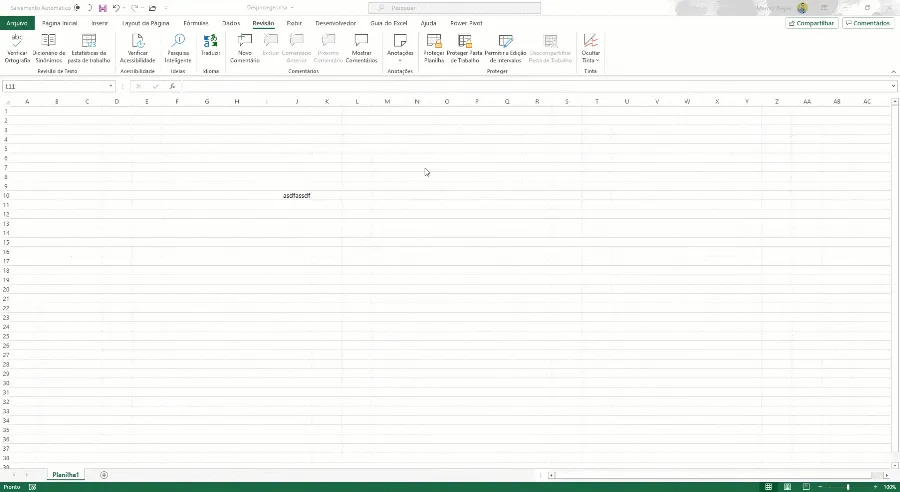
Abaixo o código fonte que realiza a remoção da senha da planilha.
Public Pasta_Arquivo As String
Sub Desprotegendo()
'----------------------------------------------------------------------------
' Algoritmo Desenvolvido por Prof. Eng. Fabio Baldini                       '
' Se Inscreva em nosso Canal - https://www.YouTube.com/ExcelSolutionsBr     '
' Contatos - Comercial@excelsolutions.com.br                                '
' Desenvolvido em 09/05/2015 - 23:45                                        '
' Duvidas entrar em contato pelo email contato@excelsolutions.com.br        '
'----------------------------------------------------------------------------

    Dim FSO As Object
    Dim oApp As Object
    Dim Fname As Variant
    Dim FileNameFolder As Variant
    Dim DefPath As String
    Dim strDate As String
    Dim FileNameZip, FolderName, oFolder
    Dim oApp1 As Object
    Dim MyPath As String
    Dim str As String

    str = Application.GetOpenFilename("Excel Files (*.xls;*.xlsb;*.xlsx;*.xlsm),*.xls;*.xlsb;*.xlsx;*.xlsm")
    If Not str = "Falso" And Not str = "False" Then

        lastSlash = InStrRev(str, "\")
        'str1 = Mid(str, lastSlash + 1)

        Caminho = str
        Ponto = InStrRev(Caminho, ".")
        Extensao = Mid(Caminho, Ponto + 1, Len(Caminho) - Ponto)
        Caminho_Zip = Left(Caminho, Ponto - 1) & ".zip"
        Nome_Arquivo = Mid(Caminho, InStrRev(Caminho, "\") + 1, Len(Caminho))
        Pasta_Arquivo = Replace(Caminho, "\" & Nome_Arquivo, "")
        Nome_Arquivo_1 = Mid(Caminho, InStrRev(Caminho, "\") + 1, Ponto - InStrRev(Caminho, "\") - 1)

        Call Limpa_Pasta

        Name Caminho As Caminho_Zip

        Fname = Caminho_Zip
        DefPath = Pasta_Arquivo
        If Right(DefPath, 1)  "\" Then
            DefPath = DefPath & "\"
        End If

        FileNameFolder = DefPath & "Arquivo1\"

        MkDir FileNameFolder

        Set oApp = CreateObject("Shell.Application")

        oApp.Namespace(FileNameFolder).CopyHere oApp.Namespace(Fname).items

        On Error Resume Next
        Set FSO = CreateObject("scripting.filesystemobject")
        FSO.deletefolder Environ("Temp") & "\Temporary Directory*", True

        Arquivos = Dir(FileNameFolder & "xl\worksheets\*.xml")
        Valor_Substituido = ""

        While Arquivos  Empty

            Close #1
            Open FileNameFolder & "xl\worksheets\" & Arquivos For Input As #1
            strFinal = Empty
            Texto_Final = Empty
            While EOF(1) = False

                Line Input #1, strLine
                Valor_Ini_xls = InStr(strLine, "<sheetProtection password")
                Valor_Ini_xlsx = InStr(strLine, " 0 Then
                    Valor_Fim = InStr(Valor_Ini_xls, strLine, ">")
                    Texto_Final = Left(strLine, Valor_Ini_xls - 1) & Valor_Substituido & Mid(strLine, Valor_Fim + 1, Len(strLine))
                End If
                If Valor_Ini_xlsx > 0 Then
                     Valor_Fim = InStr(Valor_Ini_xlsx, strLine, ">")
                     Texto_Final = Left(strLine, Valor_Ini_xlsx - 1) & Valor_Substituido & Mid(strLine, Valor_Fim + 1, Len(strLine))
                End If
                strFinal = strFinal + Texto_Final
            Wend
            Texto_Final = Empty
            Close #1

            Open FileNameFolder & "xl\worksheets\" & Arquivos For Output As #1
            Print #1, strFinal
            Close #1

            Arquivos = Dir()
        Wend

        DefPath = Pasta_Arquivo
        If Right(DefPath, 1)  "\" Then
            DefPath = DefPath & "\"
        End If

        FileNameZip = DefPath & Nome_Arquivo_1 & ".zip"

        Set oApp1 = CreateObject("Shell.Application")

        NewZip (FileNameZip)

        FolderName = DefPath & "Arquivo1"
        If Right(FolderName, 1)  "\" Then
            FolderName = FolderName & "\"
        End If

        oApp1.Namespace(FileNameZip).CopyHere oApp1.Namespace(FolderName).items

        On Error Resume Next
        Do Until oApp1.Namespace(FileNameZip).items.Count = oApp1.Namespace(FolderName).items.Count
            Application.Wait (Now + TimeValue("0:00:01"))
        Loop
        On Error GoTo 0

        Name Caminho_Zip As Caminho
        Call Limpa_Pasta
        Call Limpa_Pasta
        MsgBox "Arquivo Desprotegido com Sucesso!", vbInformation, "Atenção!"
    End If
End Sub

Sub NewZip(sPath)
    If Len(Dir(sPath)) > 0 Then Kill sPath
    Open sPath For Output As #1
    Print #1, Chr$(80) & Chr$(75) & Chr$(5) & Chr$(6) & String(18, 0)
    Close #1
End Sub
Sub Limpa_Pasta()
    On Error Resume Next
    Set FSO = CreateObject("scripting.filesystemobject")

    MyPath = Pasta_Arquivo & "\Arquivo1"

    If Right(MyPath, 1) = "\" Then
        MyPath = Left(MyPath, Len(MyPath) - 1)
    End If

    If FSO.FolderExists(MyPath) = True Then
        Application.Wait (Now + TimeValue("0:00:02"))
        FSO.deletefolder MyPath & "\*.*", True
        FSO.deletefolder MyPath
    End If
    On Error GoTo -1
End Sub
Como desproteger VBA Excel
Para desproteger o código VBA é utilizado o código abaixo, chame então no VBA o GeneralSUB e selecione o arquivo.
Ao processar o arquivo é alterada a senha do VBA e exibida a nova senha.
'---------------------------------------------------------------------------
' Créditos a remoção do VBA para o site - http://lbeliarl.blogspot.com.br/
' Anton 23-03-2014
' Alteração para a senha 'excelsolutions'
' Duvidas entrar em contato pelo email contato@excelsolutions.com.br
'---------------------------------------------------------------------------

Option Base 1

Function ProtectedVBProject(ByRef wb As Workbook) As Boolean

Dim VBC As Integer

VBC = -1
On Error Resume Next
  VBC = wb.VBProject.VBComponents.Count
On Error GoTo 0

If VBC = -1 Then
  ProtectedVBProject = True
Else
  ProtectedVBProject = False
End If

End Function

Sub GeneralSub()

Dim CopyFname As Variant
Dim FileNameFolder As Variant

ChDir (Environ("USERPROFILE") & "\Desktop")

Fname = Application.GetOpenFilename(filefilter:="Excel files (*.xlsm), *.xlsm", MultiSelect:=False)

If Fname = False Then
    Exit Sub
End If

On Error Resume Next
Dim tmpWB As Workbook

Set tmpWB = Workbooks.Open(Fname, ReadOnly:=True, Password:="")
If Err.Number > 0 Then
  MsgBox "O arquivo selecionado está encriptado (Senha de abertura)!" & vbCrLf & "Este prgrama não funciona com a senha de abertura.", vbCritical, "Desproteção VBA"
  Exit Sub
End If
On Error GoTo 0

If tmpWB.MultiUserEditing = True Then

  tmpWB.Close saveChanges:=False
  MsgBox "O arquivo selecionado está em modo de compartilhamento!" & vbCrLf & "Por gentileza altere esse modo para exclusivo (Não Compartilhado) e tente novamente!", vbExclamation, "Desproteção VBA"
  Exit Sub
End If

ProjectProtected = ProtectedVBProject(tmpWB)

tmpWB.Close saveChanges:=False
Set tmpWB = Nothing

If ProjectProtected Then

        Dim FSO As Object
        Set FSO = CreateObject("scripting.filesystemobject")

        CopyFname = Left(Fname, Len(Fname) - 4) & "zip"
        LastSeparatorPos = Len(CopyFname) - InStr(1, StrReverse(CopyFname), CStr(Application.PathSeparator), vbTextCompare) + 1
        CopyFname = Left(CopyFname, LastSeparatorPos) & "Desprotegido_" & Right(CopyFname, Len(CopyFname) - LastSeparatorPos)

        FSO.CopyFile Fname, CopyFname, True

        FileNameFolder = Environ("tmp") & "\UnlockFolderTMP"

        If FSO.FolderExists(FileNameFolder & "\") Then
           FSO.deletefolder FileNameFolder
        End If

        FSO.CreateFolder FileNameFolder
End If

Dim OutMSG As String
OutMSG = ""

If ProjectProtected = True Then
   OutMSG = ChangePasswordForVBA(CopyFname, FileNameFolder)
Else
   OutMSG = "O Arquivo selecionado não tem senha de Proteção no VBA!"
End If

If ProjectProtected Then
        If FSO.FolderExists(FileNameFolder & "\") Then
           FSO.deletefolder FileNameFolder
        End If

        CopyFname_unlocked = Left(CopyFname, Len(CopyFname) - 3) & "xlsm"

        If FSO.FileExists(CopyFname_unlocked) Then
          FSO.DeleteFile CopyFname_unlocked, True
        End If

        FSO.MoveFile CopyFname, CopyFname_unlocked
        Set FSO = Nothing
End If

MsgBox OutMSG, vbInformation, "Desproteção VBA"

End Sub

Function ChangePasswordForVBA(CopyFname As Variant, FileNameFolder As Variant) As String

Set oApp = CreateObject("Shell.Application")

ProjectFileFound = False

For Each fileNameInZip In oApp.Namespace(CopyFname).items
    If fileNameInZip = "xl" Then
       For Each subFile In fileNameInZip.Getfolder.items
            If subFile = "vbaProject.bin" Then
                  oApp.Namespace(FileNameFolder).movehere subFile
                  ProjectFileFound = True
                  Exit For
            End If
       Next
    End If
Next

''HASH for Password = 'excelsolutions'
Dim PasswordString As String
PasswordString = "858729CFD9D6F6D6F6290AD7F606B271AF8AB70384F2FC4A134364C356CE3EB34B4F62B5B6A2"

If ProjectFileFound = True Then
    tmpMSG = ""
    tmpMSG = ChangeDPBValue(FileNameFolder & "\vbaProject.bin", PasswordString)
    oApp.Namespace(CopyFname).items.Item("xl").Getfolder.CopyHere FileNameFolder & "\vbaProject.bin"

    On Error Resume Next
    Do Until oApp.Namespace(CopyFname).items.Item("xl").Getfolder.items.Item("vbaProject.bin").Name = "vbaProject.bin"
        Application.Wait (Now + TimeValue("0:00:01"))
    Loop
    On Error GoTo 0

    If tmpMSG = "" Then
        ChangePasswordForVBA = "A Senha do VbaProject foi alterado para: 'excelsolutions'"
    Else
        ChangePasswordForVBA = tmpMSG
    End If

Else
    ChangePasswordForVBA = "O Arquivo não tem VBA!"
End If

Set oApp = Nothing

End Function

Function ChangeDPBValue(PathToBinFile As String, HASHPassword As String) As String

Dim PasswordArrayByte() As Byte

Set adoStream = CreateObject("ADODB.Stream")
Set adoBin = CreateObject("ADODB.Stream")

ReDim PasswordArrayByte(Len(HASHPassword))

For i = 1 To Len(HASHPassword)
  PasswordArrayByte(i) = Asc(Mid(HASHPassword, i, 1))
Next i

With adoStream
    .Mode = 3
    .Type = 2
    .Charset = "us-ascii"
    .Open
    .LoadFromFile (PathToBinFile)
    bytes = .ReadText

    StartPosVal = InStr(1, bytes, "DPB=", vbTextCompare) + 5

    If StartPosVal = 5 Then
        .Close
        Set adoStream = Nothing
        Set adoBin = Nothing
        ChangeDPBValue = "Não encontrato a Proteção VBA!"
        Exit Function
    End If

    EndPosVal = InStr(StartPosVal, bytes, """", vbTextCompare) - 1
    ValLength = EndPosVal - StartPosVal + 1

    If Len(HASHPassword) < ValLength Then
       ReDim Preserve PasswordArrayByte(Len(HASHPassword) + ValLength - Len(HASHPassword))

       For i = Len(HASHPassword) + 1 To UBound(PasswordArrayByte)
          PasswordArrayByte(i) = Asc(0)
       Next i
    End If

    .Close
End With

With adoStream
    .Mode = 3
    .Type = 1
    .Open
    .LoadFromFile (PathToBinFile)

    With adoBin
        .Mode = 3
        .Type = 1
        .Open
    End With

    .Position = 0
    .CopyTo adoBin, StartPosVal - 1

     adoBin.Write (PasswordArrayByte)

    .Position = EndPosVal
    .CopyTo adoBin

    adoBin.SaveToFile PathToBinFile, 2
    adoBin.Close

    .Close
End With

Set adoStream = Nothing
Set adoBin = Nothing
ChangeDPBValue = ""

End Function
Download da planilha de Desproteger Planilha e VBA
Clique no botão abaixo para baixar a planilha de desproteger planilhas e VBA.
Abraço
Marcos Rieper
Curso Excel Completo – Do Básico ao VBA
Quer aprender Excel do Básico, passando pela Avançado e chegando no VBA? Clique na imagem abaixo:

Este conteúdo foi útil?
Continue lendo
Como Criar Suplementos VBA no Excel
Criar um suplemento VBA no Excel é uma das formas mais poderosas de transformar suas automações em ferramentas profissionais e reutilizáveis.

Número por Extenso no Excel
Como escrever o número por extenso no Excel com fórmulas e VBA. Passo-a-passo tutorial e download gratuito de planilha com exemplo.

Suplemento Excel Gratuito - Guia do Excel
Como instalar um suplemento no Excel e também como instalar o suplemento gratuito do Guia do Excel. Recursos para te dar mais agilidade.