Cadastro de clientes VBA Excel com Imagem e Pesquisa
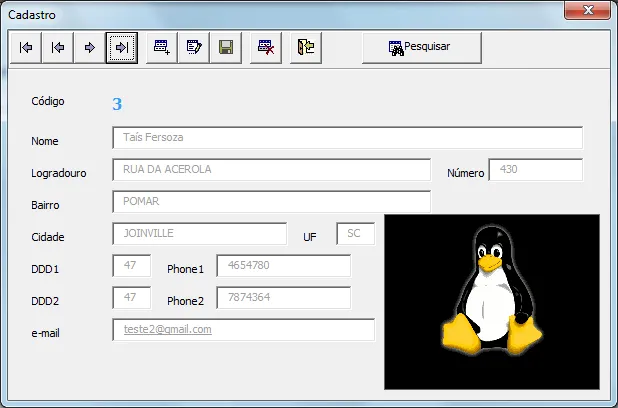
Cadastro de clientes VBA Excel com Imagem e Pesquisa - Este é um cadastro completo em Excel VBA com pesquisa de clientes pelo nome.
Especialista em Excel
Objetivo: Disponibilizar um exemplo de cadastro de clientes Excel VBA com imagem e pesquisa.
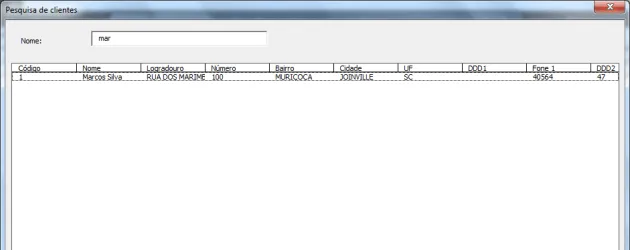
Este exemplo de planilha complementa o artigo http://guiadoexcel.com.br/cadastro-vba-com-imagem incluindo no mesmo a pesquisa dos dados cadastrados buscando pelo nome.
Em um novo artigo vou alterar este projeto para que possam ser realizadas buscas por outros campos também.
Abaixo o código fonte do formulário de cadastro e de pesquisa utilizando um cadastro VBA Excel e o ListBox, pesquisando ainda e selecionando o item na planilha.
Private Sub cmdAlterar_Click()
    lsHabilitar
End Sub

Private Sub cmdAnterior_Click()
    Dim currentFind As Range

    If IsNumeric(lblCod.Caption) = True Then
        Set currentFind = Worksheets("Clientes").Range("A:A").Find(lblCod.Caption, , _
            Excel.XlFindLookIn.xlValues, Excel.XlLookAt.xlPart, _
            Excel.XlSearchOrder.xlByRows, Excel.XlSearchDirection.xlNext, False)

        If currentFind.Row >= 2 And IsNumeric(Worksheets("Clientes").Cells(currentFind.Row - 1, 1)) Then
            lsLocalizaRegistroStudent (CLng(Worksheets("Clientes").Cells(currentFind.Row - 1, 1)))
            Me.Image1.Picture = LoadPicture(Worksheets("Clientes").Cells.Range("M" & currentFind.Row - 1).Value)
            Image1.PictureSizeMode = fmPictureSizeModeStretch
        End If
        Sheets("Menu").Activate
    End If
End Sub

Private Sub cmdExcluir_Click()
    Dim lLinha As Long
    Dim currentFind As Range
    Dim lPosicao As String

    iTotalLinhas = Sheets("Clientes").Cells(Rows.Count, 1).End(xlUp).Row

    If IsNumeric(lblCod.Caption) = True Then
        Set currentFind = Worksheets("Clientes").Range("A:A").Find(lblCod.Caption, , _
            Excel.XlFindLookIn.xlValues, Excel.XlLookAt.xlPart, _
            Excel.XlSearchOrder.xlByRows, Excel.XlSearchDirection.xlNext, False)

        lLinha = currentFind.Row

        currentFind.EntireRow.Delete

        If lLinha  2 Then
            lsLocalizaRegistroStudent (CLng(Worksheets("Clientes").Cells(lLinha + 1, 1)))
        Else
            lsLimparStudents
        End If

        Sheets("Menu").Activate
    End If

    Sheets("Menu").Activate
End Sub

Private Sub cmdIncluir_Click()
    lsHabilitar
    lsLimparStudents

    txtName.SetFocus
End Sub

Private Sub cmdProximo_Click()
    Dim lLinha As Long
    Dim currentFind As Range

    iTotalLinhas = Sheets("Clientes").Cells(Rows.Count, 1).End(xlUp).Row

    If IsNumeric(lblCod.Caption) = True Then
        Set currentFind = Worksheets("Clientes").Range("A:A").Find(lblCod.Caption, , _
            Excel.XlFindLookIn.xlValues, Excel.XlLookAt.xlPart, _
            Excel.XlSearchOrder.xlByRows, Excel.XlSearchDirection.xlNext, False)

        If currentFind.Row < iTotalLinhas And IsNumeric(Worksheets("Clientes").Cells(currentFind.Row + 1, 1)) Then
            lsLocalizaRegistroStudent (CLng(Worksheets("Clientes").Cells(currentFind.Row + 1, 1)))
            Me.Image1.Picture = LoadPicture(Worksheets("Clientes").Cells.Range("M" & currentFind.Row + 1).Value)
            Image1.PictureSizeMode = fmPictureSizeModeStretch
        End If

        Sheets("Menu").Activate
    End If
End Sub

Private Sub cmdSair_Click()
    Unload Me
End Sub

Private Sub cmdPrimeiro_Click()
    lsLocalizaRegistroStudent (Worksheets("Clientes").Cells(2, 1).Value)
    Me.Image1.Picture = LoadPicture(Worksheets("Clientes").Cells.Range("M2").Value)
    Image1.PictureSizeMode = fmPictureSizeModeStretch
    Sheets("Menu").Activate
End Sub

Private Sub cmdSalvar_Click()

    If txtName.Enabled = True And lfValidarDados = True Then
        If Not IsNumeric(lblCod.Caption) = True Then
            lsInserirStudent
            Sheets("Menu").Activate
        Else
            lsAlterarStudent
            Sheets("Menu").Activate
        End If

        lsDesabilitar
        MsgBox "Registro Salvo!"
    End If
End Sub

Private Sub cmdUltimo_Click()
    Dim iTotalLinhas As Long

    iTotalLinhas = 999999

    lsLocalizaRegistroStudent (iTotalLinhas)
    Me.Image1.Picture = LoadPicture(Worksheets("Clientes").Cells.Range("M" & LinhaAtual + 2).Value)
    Image1.PictureSizeMode = fmPictureSizeModeStretch

    'Me.Image1.Picture = LoadPicture(Worksheets("Clientes").Cells.Range("M" & currentFind.Row + 1).Value)
    'Image1.PictureSizeMode = fmPictureSizeModeStretch LinhaAtual


    Sheets("Menu").Activate
End Sub

Private Sub CommandButton1_Click()
    frmPesquisaClientes.Show
End Sub

Private Sub Image1_Click()
    Dim myPictName  As String
    Dim lLinha      As Long

    myPictName = Application.GetOpenFilename(filefilter:="Picture Files,*.ico;*.bmp")

    If IsNumeric(lblCod.Caption) = True Then
        Set currentFind = Worksheets("Clientes").Range("A:A").Find(lblCod.Caption, , _
            Excel.XlFindLookIn.xlValues, Excel.XlLookAt.xlPart, _
            Excel.XlSearchOrder.xlByRows, Excel.XlSearchDirection.xlNext, False)

        lLinha = currentFind.Row
    Else
        lLinha = Sheets("Clientes").Cells(Rows.Count, 1).End(xlUp).Row + 1
    End If

    If myPictName  "" Then
        Me.Image1.Picture = LoadPicture(myPictName)
        Image1.PictureSizeMode = fmPictureSizeModeStretch
        Image1.Visible = False
        Image1.Visible = True
        Worksheets("Clientes").Cells.Range("M" & lLinha).Value = myPictName
    End If
End Sub

Private Sub UserForm_Activate()

    lsLocalizaRegistroStudent (Worksheets("Clientes").Cells(2, 1).Value)
    LinhaAtual = 2
    Sheets("Menu").Activate
End Sub

'Procedimento para selecionar arquivos
Function lfSelecionarArquivo() As String
    Dim fDlg As FileDialog
    Dim lArquivo As String

    'Chama o objeto passando os parâmetros
    Set fDlg = Application.FileDialog(FileDialogType:=msoFileDialogOpen)
    With fDlg
        'Alterar esta propriedade para True permitirá a seleção de vários arquivos
        .AllowMultiSelect = False

        'Determina a forma de visualização dos aruqivos
        .InitialView = msoFileDialogViewDetails

        'Filtro de arquivos, pode ser colocado mais do que um filtro separando com ; por exemplo: "*.xls;*.xlsm"
        .Filters.Add "Imagem", "*.bmp, *.ico", 1

        'Determina qual o drive inicial
        .InitialFileName = "C:\"
    End With

    'Retorna o arquivo selecionado
    If fDlg.Show = -1 Then
        lfSelecionarArquivo = fDlg.SelectedItems(1)
    Else
        MsgBox "Não foi selecionado nenhum arquivo"
    End If
End Function

Private Sub ListBox1_DblClick(ByVal Cancel As MSForms.ReturnBoolean)
    Sheets("Clientes").Range("A" & Sheets("Pesquisa").Range("O" & ListBox1.ListIndex + 2)).Select
End Sub

Private Sub TextBox1_KeyDown(ByVal KeyCode As MSForms.ReturnInteger, ByVal Shift As Integer)
   If KeyCode = 13 Then
        ListBox1.RowSource = ""
        pesquisa
    End If
End Sub

Sub pesquisa()
    Dim n As Long
    n = 1

    Sheets("Pesquisa").Range("A2:O1000000").Clear
    Sheets("Clientes").Select
    Sheets("Clientes").Range("B1").Select

    Do While ActiveCell  ""
        If InStr(1, UCase(ActiveCell), UCase(TextBox1)) > 0 Then
            Sheets("Pesquisa").Range("B" & n).Offset(1, -1).Value = ActiveCell.Offset(0, -1)
            Sheets("Pesquisa").Range("B" & n).Offset(1, 0).Value = ActiveCell.Offset(0, 0)
            Sheets("Pesquisa").Range("B" & n).Offset(1, 1).Value = ActiveCell.Offset(0, 1)
            Sheets("Pesquisa").Range("B" & n).Offset(1, 2).Value = ActiveCell.Offset(0, 2)
            Sheets("Pesquisa").Range("B" & n).Offset(1, 3).Value = ActiveCell.Offset(0, 3)
            Sheets("Pesquisa").Range("B" & n).Offset(1, 4).Value = ActiveCell.Offset(0, 4)
            Sheets("Pesquisa").Range("B" & n).Offset(1, 5).Value = ActiveCell.Offset(0, 5)
            Sheets("Clientes").Range("B" & n).Offset(1, 6).Value = ActiveCell.Offset(0, 6)
            Sheets("Pesquisa").Range("B" & n).Offset(1, 7).Value = ActiveCell.Offset(0, 7)
            Sheets("Pesquisa").Range("B" & n).Offset(1, 8).Value = ActiveCell.Offset(0, 8)
            Sheets("Pesquisa").Range("B" & n).Offset(1, 9).Value = ActiveCell.Offset(0, 9)
            Sheets("Pesquisa").Range("B" & n).Offset(1, 10).Value = ActiveCell.Offset(0, 10)
            Sheets("Pesquisa").Range("B" & n).Offset(1, 11).Value = ActiveCell.Offset(0, 11)
            Sheets("Pesquisa").Range("B" & n).Offset(1, 12).Value = ActiveCell.Offset(0, 12)
            Sheets("Pesquisa").Range("B" & n).Offset(1, 13).Value = ActiveCell.Row
            n = n + 1
        End If
           ActiveCell.Offset(1, 0).Select
    Loop
    If n > 1 Then
        ListBox1.RowSource = "Pesquisa!A2:M" & n
    Else
        ListBox1.RowSource = ""
        MsgBox "Nenhum registro encontrado", vbInformation, "Aviso"
    End If
End Sub

Private Sub UserForm_Activate()
    TextBox1.SetFocus
End Sub

Private Sub UserForm_Click()

End Sub
Public LinhaAtual As Long

Sub lsShowStudents()
    frmCadastroStudents.Show
End Sub

Sub lsInserirStudent()

    Dim iTotalLinhas As Integer
    Dim lUltima As Long

    iTotalLinhas = Sheets("Clientes").Cells(Rows.Count, 1).End(xlUp).Row + 1

    If IsNumeric(Sheets("Clientes").Cells(iTotalLinhas - 1, 1).Value) Then
        lUltima = Sheets("Clientes").Cells(iTotalLinhas - 1, 1).Value + 1
    Else
        lUltima = 1
    End If

    With frmCadastroStudents
        .lblCod = lUltima
        Sheets("Clientes").Cells(iTotalLinhas, 1).Value = lUltima
        Sheets("Clientes").Cells(iTotalLinhas, 2).Value = .txtName
        Sheets("Clientes").Cells(iTotalLinhas, 3).Value = .txtAddress
        Sheets("Clientes").Cells(iTotalLinhas, 4).Value = .txtNumber
        Sheets("Clientes").Cells(iTotalLinhas, 5).Value = .txtNeighb
        Sheets("Clientes").Cells(iTotalLinhas, 6).Value = .txtCity
        Sheets("Clientes").Cells(iTotalLinhas, 7).Value = .txtUF
        Sheets("Clientes").Cells(iTotalLinhas, 8).Value = .txtDDD1
        Sheets("Clientes").Cells(iTotalLinhas, 9).Value = .txtPhone1
        Sheets("Clientes").Cells(iTotalLinhas, 10).Value = .txtDDD2
        Sheets("Clientes").Cells(iTotalLinhas, 11).Value = .txtPhone2
        Sheets("Clientes").Cells(iTotalLinhas, 12).Value = .txtEmail
    End With
End Sub

Sub lsLocalizaRegistroStudent(ByVal lRegistro As Long)

    Dim lLinha As Long

    'Sheets("Clientes").Activate
    iTotalLinhas = Sheets("Clientes").Cells(Rows.Count, 1).End(xlUp).Row

    'Define a Range de Pesquisa
    Set currentFind = Worksheets("Clientes").Range("A:A").Find(lRegistro, , _
        Excel.XlFindLookIn.xlValues, Excel.XlLookAt.xlPart, _
        Excel.XlSearchOrder.xlByRows, Excel.XlSearchDirection.xlNext, False)

    If lRegistro = 999999 Then
        lLinha = iTotalLinhas

        Set currentFind = Worksheets("Clientes").Range("A:A").Find(lLinha - 1, , _
            Excel.XlFindLookIn.xlValues, Excel.XlLookAt.xlPart, _
            Excel.XlSearchOrder.xlByRows, Excel.XlSearchDirection.xlNext, False)
    Else
        If Not currentFind Is Nothing Then
            lLinha = currentFind.Row
        End If
    End If

    If Not currentFind Is Nothing Then
        With frmCadastroStudents
            .lblCod = Sheets("Clientes").Cells(lLinha, 1).Value
            .txtName = Sheets("Clientes").Cells(lLinha, 2).Value
            .txtAddress = Sheets("Clientes").Cells(lLinha, 3).Value
            .txtNumber = Sheets("Clientes").Cells(lLinha, 4).Value
            .txtNeighb = Sheets("Clientes").Cells(lLinha, 5).Value
            .txtCity = Sheets("Clientes").Cells(lLinha, 6).Value
            .txtUF = Sheets("Clientes").Cells(lLinha, 7).Value
            .txtDDD1 = Sheets("Clientes").Cells(lLinha, 8).Value
            .txtPhone1 = Sheets("Clientes").Cells(lLinha, 9).Value
            .txtDDD2 = Sheets("Clientes").Cells(lLinha, 10).Value
            .txtPhone2 = Sheets("Clientes").Cells(lLinha, 11).Value
            .txtEmail = Sheets("Clientes").Cells(lLinha, 12).Value
            frmCadastroStudents.Image1.Picture = LoadPicture(Worksheets("Clientes").Cells.Range("M" & lLinha).Value)
            frmCadastroStudents.Image1.PictureSizeMode = fmPictureSizeModeStretch
        End With
    End If
End Sub

Sub lsAlterarStudent()

    'Define a Range de Pesquisa
    Set currentFind = Worksheets("Clientes").Range("A:A").Find(frmCadastroStudents.lblCod, , _
        Excel.XlFindLookIn.xlValues, Excel.XlLookAt.xlPart, _
        Excel.XlSearchOrder.xlByRows, Excel.XlSearchDirection.xlNext, False)

    lLinha = currentFind.Row

    With frmCadastroStudents
        Sheets("Clientes").Cells(lLinha, 2).Value = .txtName
        Sheets("Clientes").Cells(lLinha, 3).Value = .txtAddress
        Sheets("Clientes").Cells(lLinha, 4).Value = .txtNumber
        Sheets("Clientes").Cells(lLinha, 5).Value = .txtNeighb
        Sheets("Clientes").Cells(lLinha, 6).Value = .txtCity
        Sheets("Clientes").Cells(lLinha, 7).Value = .txtUF
        Sheets("Clientes").Cells(lLinha, 8).Value = .txtDDD1
        Sheets("Clientes").Cells(lLinha, 9).Value = .txtPhone1
        Sheets("Clientes").Cells(lLinha, 10).Value = .txtDDD2
        Sheets("Clientes").Cells(lLinha, 11).Value = .txtPhone2
        Sheets("Clientes").Cells(lLinha, 12).Value = .txtEmail
        LinhaAtual = lLinha
    End With
End Sub

Sub lsHabilitar()
    With frmCadastroStudents
        .txtName.Enabled = True
        .txtAddress.Enabled = True
        .txtNumber.Enabled = True
        .txtNeighb.Enabled = True
        .txtCity.Enabled = True
        .txtUF.Enabled = True
        .txtDDD1.Enabled = True
        .txtPhone1.Enabled = True
        .txtDDD2.Enabled = True
        .txtPhone2.Enabled = True
        .txtEmail.Enabled = True
        .Image1.Enabled = True
    End With
End Sub

Sub lsDesabilitar()
    With frmCadastroStudents
        .txtName.Enabled = False
        .txtAddress.Enabled = False
        .txtNumber.Enabled = False
        .txtNeighb.Enabled = False
        .txtCity.Enabled = False
        .txtUF.Enabled = False
        .txtDDD1.Enabled = False
        .txtPhone1.Enabled = False
        .txtDDD2.Enabled = False
        .txtPhone2.Enabled = False
        .txtEmail.Enabled = False
        .Image1.Enabled = False
    End With
End Sub

Sub lsLimparStudents()
    With frmCadastroStudents
        .lblCod.Caption = ""
        .txtName.Text = ""
        .txtAddress.Text = ""
        .txtNumber.Text = ""
        .txtNeighb.Text = ""
        .txtCity.Text = ""
        .txtUF.Text = ""
        .txtDDD1.Text = ""
        .txtPhone1.Text = ""
        .txtDDD2.Text = ""
        .txtPhone2.Text = ""
        .txtEmail.Text = ""
        .Image1.Picture = LoadPicture("")
    End With
End Sub

Function lfValidarDados() As Boolean

    lfValidarDados = False

    With Worksheets("Validacao")
        If frmCadastroStudents.txtName.Text = "" And .Cells(3, 2).Value = "Sim" Then
            MsgBox "O campo Nome é obrigatório!"
            frmCadastroStudents.txtName.SetFocus
            GoTo Sair
        End If
        If frmCadastroStudents.txtAddress.Text = "" And .Cells(4, 2).Value = "Sim" Then
            MsgBox "O campo Logradouro é obrigatório!"
            frmCadastroStudents.txtAddress.SetFocus
            GoTo Sair
        End If
        If frmCadastroStudents.txtNumber.Text = "" And .Cells(5, 2).Value = "Sim" Then
            MsgBox "O campo Número é obrigatório!"
            frmCadastroStudents.txtNumber.SetFocus
            GoTo Sair
        End If
        If frmCadastroStudents.txtNeighb.Text = "" And .Cells(6, 2).Value = "Sim" Then
            MsgBox "O campo Bairro é obrigatório!"
            frmCadastroStudents.txtNeighb.SetFocus
            GoTo Sair
        End If
        If frmCadastroStudents.txtCity.Text = "" And .Cells(7, 2).Value = "Sim" Then
            MsgBox "O campo Cidade é obrigatório!"
            frmCadastroStudents.txtCity.SetFocus
            GoTo Sair
        End If
        If frmCadastroStudents.txtUF.Text = "" And .Cells(8, 2).Value = "Sim" Then
            MsgBox "O campo UF é obrigatório!"
            frmCadastroStudents.txtUF.SetFocus
            GoTo Sair
        End If
        If frmCadastroStudents.txtDDD1.Text = "" And .Cells(9, 2).Value = "Sim" Then
            MsgBox "O campo DDD1 é obrigatório!"
            frmCadastroStudents.txtDDD1.SetFocus
            GoTo Sair
        End If
        If frmCadastroStudents.txtPhone1.Text = "" And .Cells(10, 2).Value = "Sim" Then
            MsgBox "O campo Fone1 é obrigatório!"
            frmCadastroStudents.txtPhone1.SetFocus
            GoTo Sair
        End If
        If frmCadastroStudents.txtDDD2.Text = "" And .Cells(11, 2).Value = "Sim" Then
            MsgBox "O campo DDD2 é obrigatório!"
            frmCadastroStudents.txtDDD2.SetFocus
            GoTo Sair
        End If
        If frmCadastroStudents.txtPhone2.Text = "" And .Cells(12, 2).Value = "Sim" Then
            MsgBox "O campo Fone2 é obrigatório!"
            frmCadastroStudents.txtPhone2.SetFocus
            GoTo Sair
        End If
        If frmCadastroStudents.txtEmail.Text = "" And .Cells(13, 2).Value = "Sim" Then
            MsgBox "O campo e-mail é obrigatório!"
            frmCadastroStudents.txtEmail.SetFocus
            GoTo Sair
        End If
    End With

    lfValidarDados = True

Sair:
    Exit Function
End Function
Planilha de Controle Financeiro no Excel
Tenha um controle bonito e completo do seu financeiro.
- Categorias e subcategorias já configuradas
- Planilhas separadas por tabela (configuração, lançamentos, resumo)
- Personalize com suas próprias categorias e ícones
Planilha de Pequenas Empresas
Você tem uma pequena empresa e precisa de um controle simples e profissional?
Conheça a nossa planilha de Vendas e Estoque.
Funcionalidades
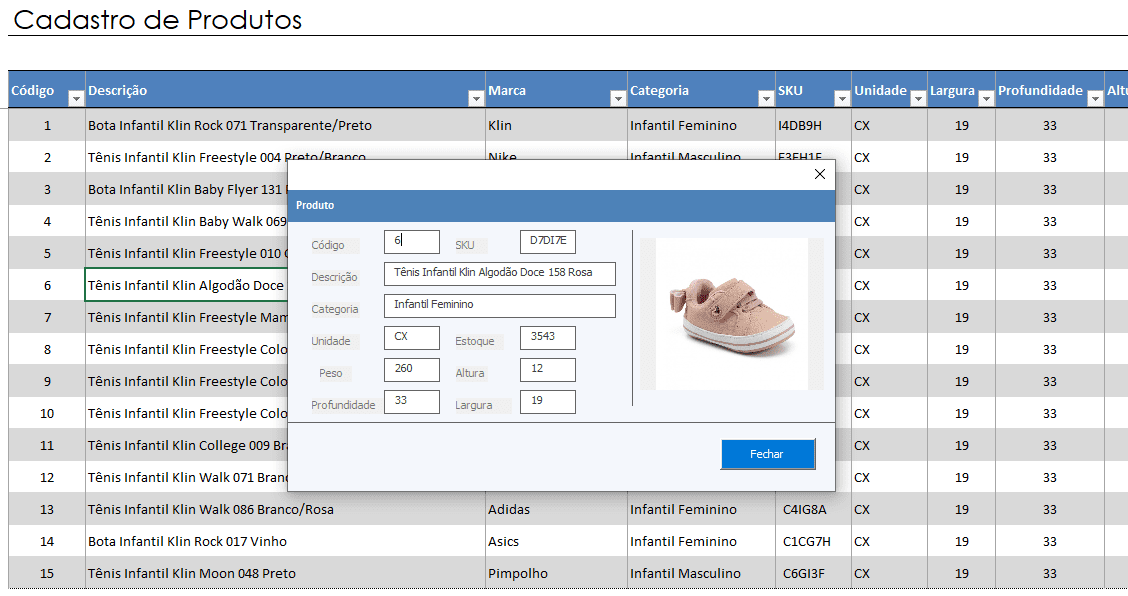
- Cadastro de clientes
- Configurações
- Fornecedores
- Metas Vendas
- Produtos
- Vendedores
- Entrada de produto
- Saída de estoque
- Fluxo de caixa
- Vendas
Relatórios
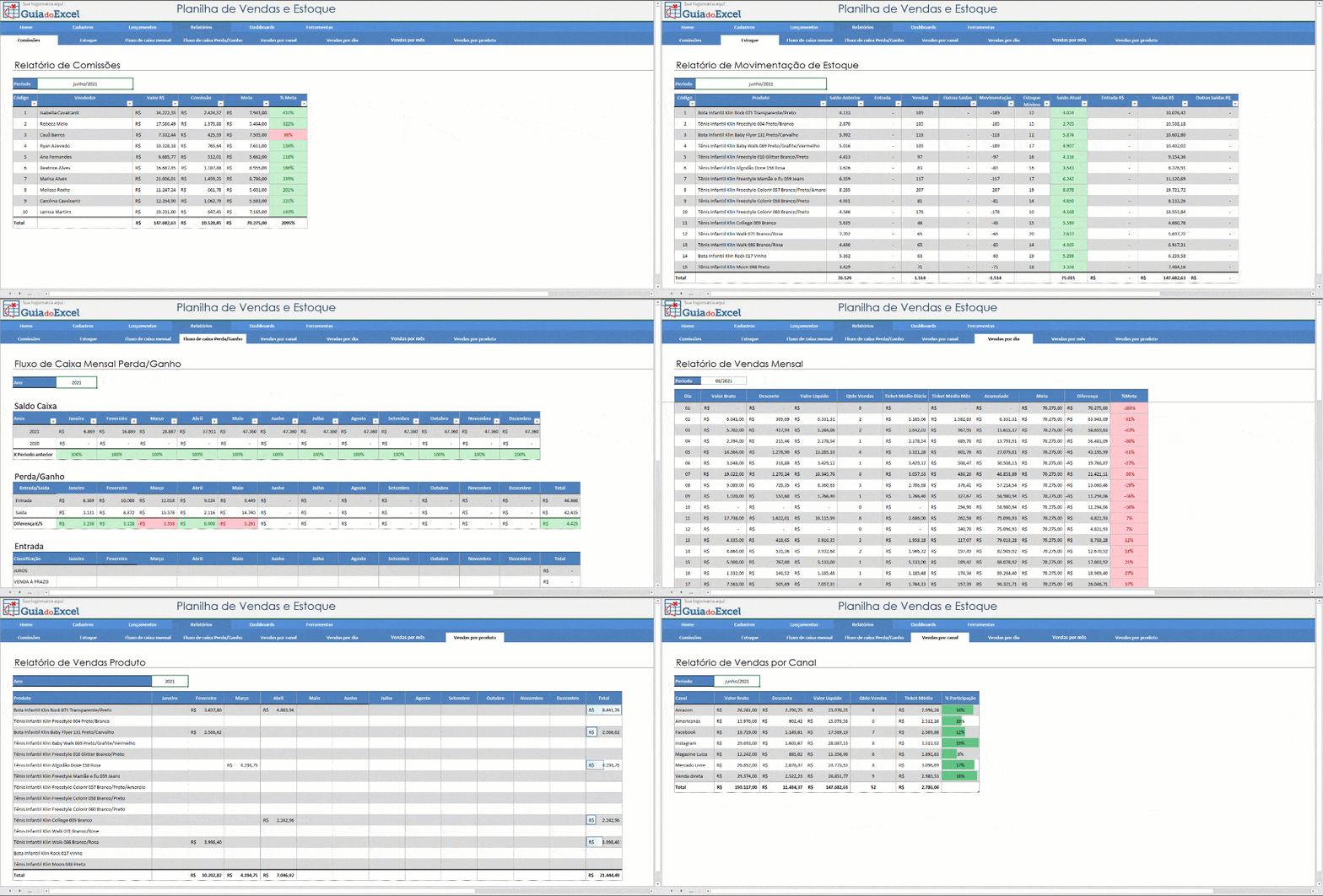
- Comissões
- Estoque
- Fluxo de caixa mensal
- Fluxo de caixa Perda/Ganho
- Vendas por canal
- Vendas por dia
- Vendas por mês
- Vendas por produto
Dashboards
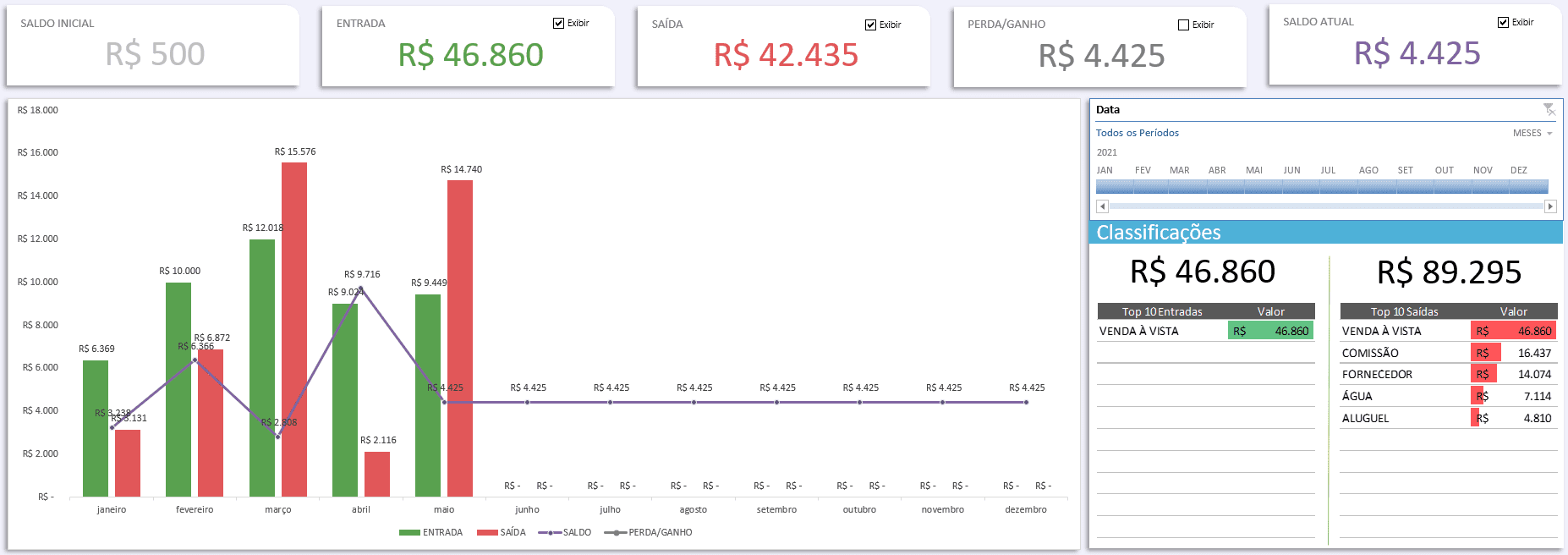
- Dashboard de Vendas
- Dashboard de Fluxo de Caixa
Ferramentas

- Cálculo de preço do produto
- Planilha de orçamento para o cliente
São mais de 20 funcionalidades em uma solução completa para o gerenciamento da sua empresa, clique abaixo para conhecer mais e comprar a planilha.
Download da planilha
Este conteúdo foi útil?
Continue lendo

Como Realizar Conciliação Bancária Passo-a-passo no Excel
Como realizar conciliação bancária no Excel passo-a-passo com aula e download gratuito da planilha de exemplo.

Planilha de Controle de Estoque Grátis
Neste artigo você tem uma planilha de controle de estoque grátis Excel com dashboard e download gratuito da planilha.

Planilha de Férias Excel Grátis
Neste artigo você verá uma planilha de controle de férias em Excel aonde você terá o um controle completo e gratuito.